
InTown
LifeAgentsNews & Magazines
4.613.00 Reviews
- Version
- 25.52.16
- Installs
- 10.00K
- Age Rating
- Everyone
Screenshots
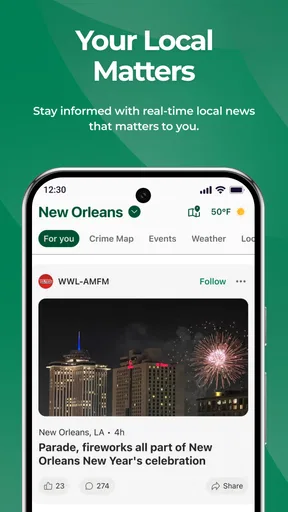
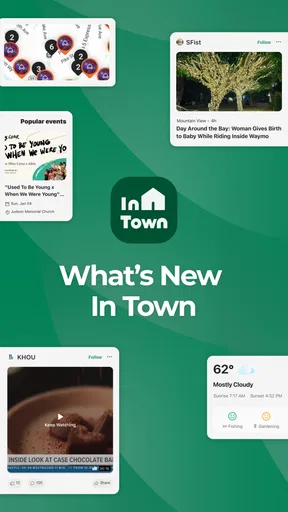
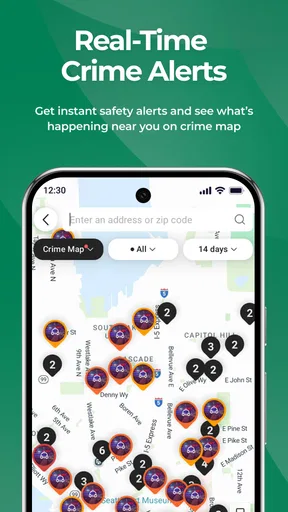
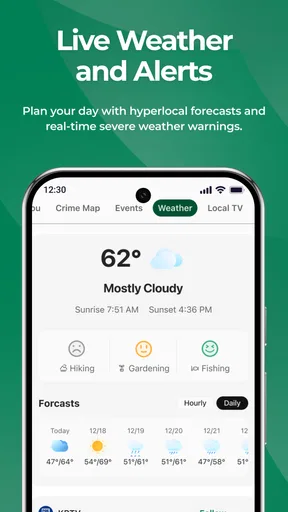
Our Review of InTown
 Analysis by Appyee
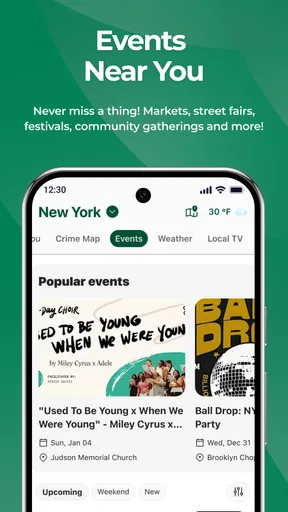
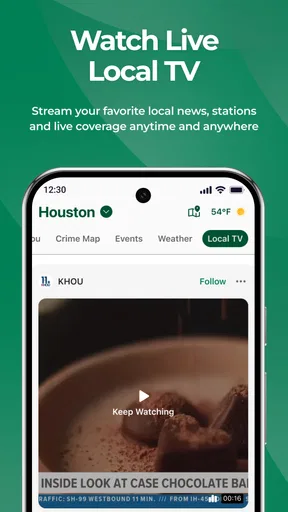
When I first opened InTown, I understood its appeal quickly: it is built around the information people usually need from their own area, rather than the endless national stream found in large news apps. Its focus is local news, crime alerts, local television, and events, so the experience feels more like checking what is happening nearby than browsing a general newspaper replacement. I found that focus useful on ordinary days, especially when I wanted practical awareness without sorting through unrelated headlines.
InTown is a free News & Magazines app from LifeAgents, available for users on Android 8.0 or later. It is marked for Everyone, which makes it suitable for a broad household audience, although that does not mean every local-news item will be comfortable for every reader. The app has a 4.6 average from around 113 ratings, with 10K+ installs, so it has a modest but visible user base rather than the reach of a major national news platform.
How InTown works in a shared household
The most convincing use case for me is a shared-device routine. Imagine a household tablet on a kitchen counter or a phone that several people check during the day. One person can look for local headlines in the morning, another can check crime-related updates before leaving work, and someone else can browse nearby events later. Because the app brings these local subjects together, it can act as a quick community bulletin rather than a personal reading library.
That distinction matters. A mainstream news app is usually designed around national stories, personalized recommendations, breaking news, and broad categories. InTown is more useful when the question is, “What is happening around us?” rather than, “What is the biggest story in the country?” I would not replace a full news service with it, but I can see it fitting naturally beside one.
In a real household scenario, I would use it before planning the day. A quick look at local news can provide context, the crime-alert area can draw attention to nearby incidents, television information can help someone find local coverage, and the events section can influence weekend plans. The advantage is not that each item is necessarily more detailed than what other sources provide. The advantage is having these local interests in one place.
For shared use, I recommend treating the app as a common information window rather than assuming that every person is seeing a completely separate personalized experience. If several people use the same device, the safest habit is to read the visible content as a household resource and avoid treating it like a private account dashboard. That approach keeps expectations clear and prevents one person’s browsing habits from being mistaken for another’s.
What the local focus does better than broad news apps
The strongest benefit is relevance. Large news applications can bury neighborhood information under national politics, international events, sports, business, and opinion. InTown starts from the opposite direction. Its subject matter is narrower, but that narrowness is exactly why it can be quicker for local awareness.
I also like the way its four main interests complement one another. Local news gives general context, crime alerts serve a safety-oriented purpose, local television connects the app to familiar broadcast coverage, and events add a practical social layer. This combination makes the app more useful than a simple headline feed because it covers both what happened and what people may want to do next.
There is a trade-off, though. Anyone looking for deep reporting, international coverage, business analysis, or a large archive of specialist articles will probably find the scope too limited. InTown is not the right tool for replacing a newspaper subscription or a comprehensive news reader. I see it as a local layer that fills a specific gap.
Setting expectations before several people use it
My first advice for a shared device is simple: decide who the app is for before relying on it. If it belongs to one person, that user can develop a consistent routine. If it belongs to the whole household, everyone should understand that the same app may be opened by different people for different reasons.
That boundary is especially important when crime alerts are involved. A local incident can be useful information, but it can also be sensitive or alarming. I would avoid presenting every alert to a young child as entertainment, and I would discuss serious items with older children in a calm way. The Everyone content rating describes the broad suitability of the app itself; it does not turn every piece of local news into child-focused material.
I would also keep expectations realistic about privacy. A shared phone or tablet is not the same as a private personal device. Before handing it to another family member, I would close any article or screen that contains information I do not want displayed. This is not a criticism unique to InTown; it is a practical rule for any news app used by more than one person.
Practical setup, coordination, and trust
I’d treat a first session as a quick relevance check, not a commitment to a new daily habit: look at whether the local material matches the places you actually travel, work, or spend time. If it does, the next useful step is to agree on what deserves a household update and what should be checked through a fuller source, so a headline informs plans without becoming the whole story.
A sensible first session
When setting up InTown, I would begin by checking the local context rather than immediately judging the app by its first screen. Local applications are only useful when their coverage matches the place the reader cares about. I would confirm that the displayed news, alerts, television information, and events are relevant to my community, then decide whether the app deserves a regular place on the home screen.
This is one of the most important practical checks because local relevance can change from one user to another. A household may include people who work in one area, study in another, and spend weekends somewhere else. The app is most valuable when the selected local perspective matches the household’s actual daily life. If it does not, the content may feel less useful even though the app is working as intended.
I would also establish a simple routine: one short check in the morning, one later in the day if something important is expected, and an occasional look at events when planning free time. That is better than constantly refreshing a local feed. The purpose is awareness, not turning every neighborhood update into a source of anxiety.
Another useful habit is separating information from action. A crime alert may tell me that something happened nearby, but I should still use common sense and appropriate official guidance before changing plans. Likewise, an event listing can inspire an outing, but I would verify practical details before leaving. InTown can help me notice possibilities; it should not be treated as the only authority for urgent decisions.
Coordinating without turning the app into a family control tool
In a household, coordination works best when each person has a clear reason for checking the app. One adult might monitor local developments, another might look for events, and a teenager might use the television section to find nearby coverage. This division prevents everyone from repeatedly searching the same information and makes the app feel like a shared resource.
What I would not do is assume that the app can replace a family conversation. I would not rely on it as a hidden monitoring system, nor would I expect it to explain which family member viewed something. The useful coordination comes from agreeing on how the information will be used: who checks it, when important items are mentioned, and which details should be confirmed elsewhere.
A small household workflow can make a difference. During a morning check, one person can mention a local development that affects travel or plans. In the evening, another person can browse events for the weekend. If a crime-related item seems relevant, the family can discuss it directly instead of forwarding an alarming headline without context. This turns the app into a prompt for communication rather than a substitute for it.
That approach also avoids a common problem with shared devices: information gets consumed but not understood. A person may see an alert while rushing out and another may later notice the same item without knowing whether it has already been handled. A short spoken update or household message is often more effective than expecting everyone to interpret the feed independently.
Age context and responsible reading
The Everyone rating makes InTown approachable for a wide audience, but I would still use age judgment at home. Local crime coverage can involve upsetting subjects, and children may not have the context to distinguish a nearby report from an immediate personal threat. If younger users are going to browse, I would do it alongside them at first and explain the difference between staying informed and becoming frightened by every headline.
For older children and teenagers, the app could be a useful way to connect news with their own community. Local events may help them discover activities, while local television information can point them toward more detailed coverage. I would encourage them to compare important claims with trusted sources rather than accepting a short alert as the entire story.
Trust also involves knowing what the app is for. It is a local awareness tool, not a guarantee that every event, incident, or development will answer every question a household has. If a topic affects safety, travel, school, or work, I would use InTown as an early signal and then look for fuller information before acting. That is a sensible limitation to communicate to every user, especially younger ones.
Where the app may create friction
The narrow local focus can become a weakness when my interests move beyond the community. On a quiet day, there may be less to browse than in a national news app, and readers who want constant updates across many subjects may find the experience too small. I prefer that limitation to a cluttered feed, but it is still a limitation.
There is also a difference between discovering a local headline and understanding it fully. The app’s local-news role is useful for noticing what deserves attention, while a broadcaster, newspaper, or official source may be better for detailed background, corrections, schedules, or urgent instructions. I would keep those alternatives available rather than expecting InTown to carry the entire information burden.
Another trade-off appears on a shared device. A common screen is convenient, but it can expose sensitive headlines to people who did not choose to see them. Adults should be mindful of where the device is placed and when the app is opened. The app’s broad age classification does not remove the need for considerate household use.
Finally, the app is not automatically the best choice for someone who wants extensive personalization or a carefully managed reading queue. If my priority were saving articles, following specialist writers, or building a broad multi-topic digest, I would choose a more general news reader. InTown makes more sense when local awareness is the priority and simplicity is welcome.
What I would use it for, and what I would not
I would use InTown for a quick neighborhood check, discovering local events, finding local television coverage, and noticing crime-related information that may deserve a closer look. I would also use it as a conversation starter at home: a way to ask whether a local story affects plans or whether an event is worth attending.
I would not use it as my only source for emergencies, legal decisions, medical choices, or detailed investigative reading. Those situations need more complete and authoritative information. The app can point me toward an issue, but its real strength is helping me notice local subjects quickly.
That division of labor gives the app a clear place in my routine. A national news app tells me what matters broadly. A specialist source gives me depth. InTown tells me what may matter close to home. None of these roles cancels out the others, and the local focus is valuable precisely because it does not try to be everything.
Version, availability, and overall value
InTown is free, which removes the main barrier to trying it as a household utility. The current version is 25.52.16, and its Android requirement of 8.0 or later makes it accessible on many devices that are not brand new. I would still check the app on the actual shared phone or tablet before making it part of a family routine, because comfort and local relevance matter more than simply being able to install it.
The developer is LifeAgents, and the app’s current reception is encouraging without suggesting that it is a universal replacement for established news services. Around 13 written reviews sit alongside the broader rating activity, so I would read the app as a focused local tool with a developing audience rather than as a mature all-purpose newsroom.
My household verdict is positive, with clear boundaries. I recommend InTown to people who want local news, crime alerts, television information, and events gathered around their community, especially when a shared device makes quick checking convenient. I would be less likely to recommend it to someone who wants national depth, extensive customization, or a private, highly personalized reading environment.
What makes it worthwhile is the way it supports small daily decisions: whether to pay attention to a local development, look for nearby coverage, discuss a safety-related story, or plan something to do. Used that way, it earns a place beside broader news sources. Its best role is not replacing every news app, but making local awareness easier to share responsibly at home.
Verdict
Strengths of InTown
- Helps discover nearby shops, services, and activities in one place.
- Local listings can make planning errands or outings more convenient.
- Useful for supporting small businesses in your surrounding area.
- Location-based browsing makes nearby recommendations easy to find.
- Can save time compared with searching across several separate platforms.
Limitations of InTown
- Coverage and listing quality may vary significantly by location.
- Some business details may become outdated without frequent owner updates.
- Location access may be required for the app’s main features.
- Smaller towns may offer fewer listings than major urban areas.
- User reviews and recommendations may be limited in less active communities.
Other Releases by LifeAgents
View All
Local Matters: Where You Live
News & Magazines4.9
Similar Picks in This Category
View All
Google News - Daily Headlines
Google LLC4.0

X
X Corp.4.8

Flipboard:Your Social Magazine
Flipboard3.4

Opera News: breaking & local
Opera4.5

Hindi News by Dainik Bhaskar
Dainik Bhaskar Group4.0

Way2News Daily News App
Way2News ( Formerly Way2SMS )4.6
Frequently Asked Questions
What is InTown and what can I use it for?
InTown is designed to help users discover and interact with nearby places, activities, events, or local services, depending on the features available in their region. After installing it, you can typically explore local recommendations, view useful information, and decide where to go or what to do. The exact content may vary by city, so availability is worth checking before downloading.
Does InTown require my location, and is it safe to share it?
InTown may request location access to show relevant places, events, or services near you. You can usually choose whether to allow access all the time, only while using the app, or not at all. For better privacy, review the permission request carefully and select the least intrusive option that still provides the experience you want. You should also read the app’s privacy policy.
Is InTown free to download and use?
The app may be free to download, but some features, listings, bookings, promotions, or services could involve additional costs. Before confirming a purchase or reservation, check the displayed price, service fees, cancellation rules, and payment conditions. In-app availability and pricing can differ depending on your country, the business involved, and the type of activity selected.
Does InTown work in every city or country?
InTown’s usefulness depends heavily on local coverage. Some cities may offer a wide selection of places, events, and updated information, while other areas may have limited listings. Before downloading, check whether your location is supported and whether the app includes the type of content you need. Features, language support, and available services may also vary by region.
What should I do if information in InTown is outdated or inaccurate?
Local listings, opening hours, prices, and event details can change, so it is sensible to verify important information directly with the business or organizer before traveling. If InTown provides a report, feedback, or correction option, use it to flag incorrect details. Keep the application updated as well, since newer versions may improve listings, performance, and reliability.
